 PC Tweaker
Start with your devices
Review detected hardware and installed driver versions. An inventory is a starting point, not proof that every driver needs updating.
WINDOWS 10 / 11 · X64
Tweaky Driver brings detected devices, installed versions and available driver offers into one review workflow. See where a package comes from before you decide to change a working PC.
Free download for Windows 10 and Windows 11, 64-bit (x64). Official releases by Aurelio Avila. Read the release notes and verify the publisher signature before installation.
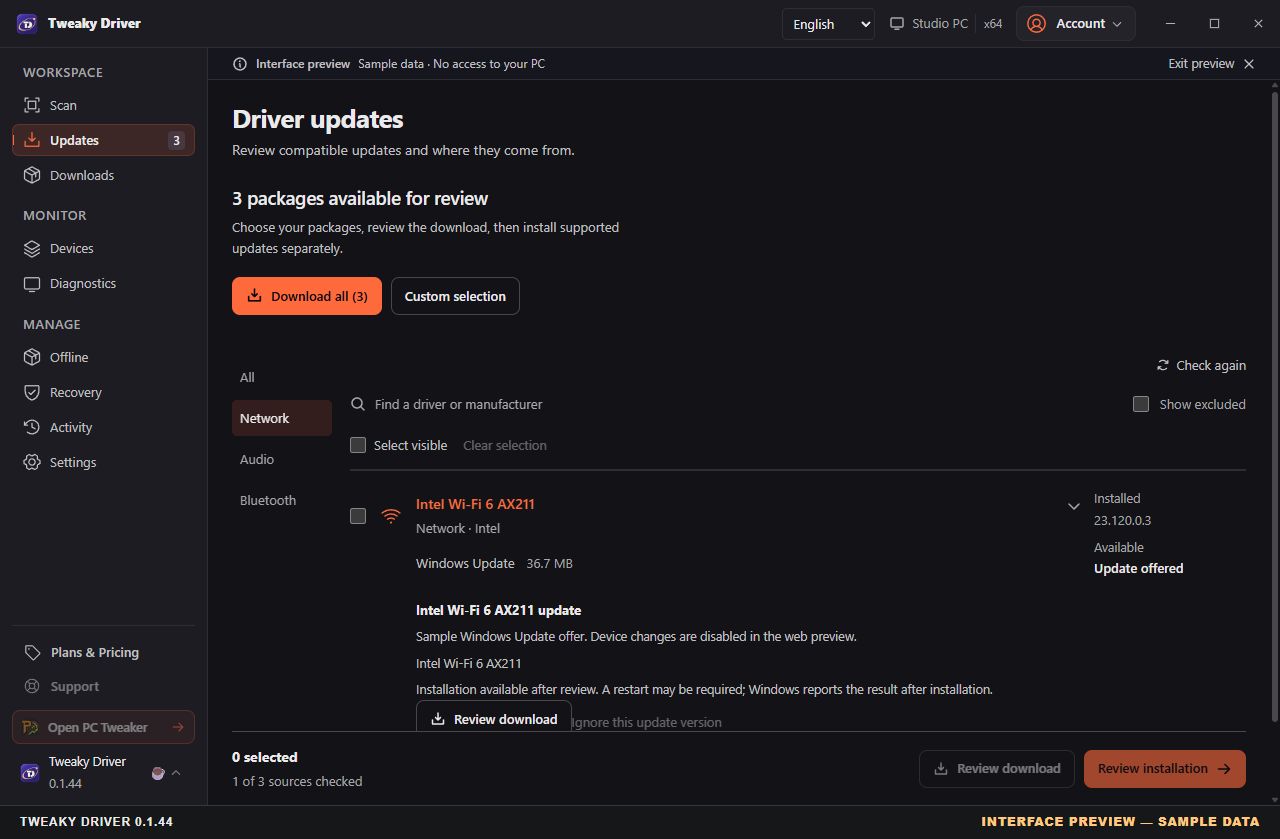
INTERFACE PREVIEW · EXAMPLE DATA
Captured on November 3, 2026 from an earlier release frontend using its built-in sample workstation. Device counts, versions and package offers are demonstration data. This preview has no access to your PC; it does not establish real-device compatibility or performance.
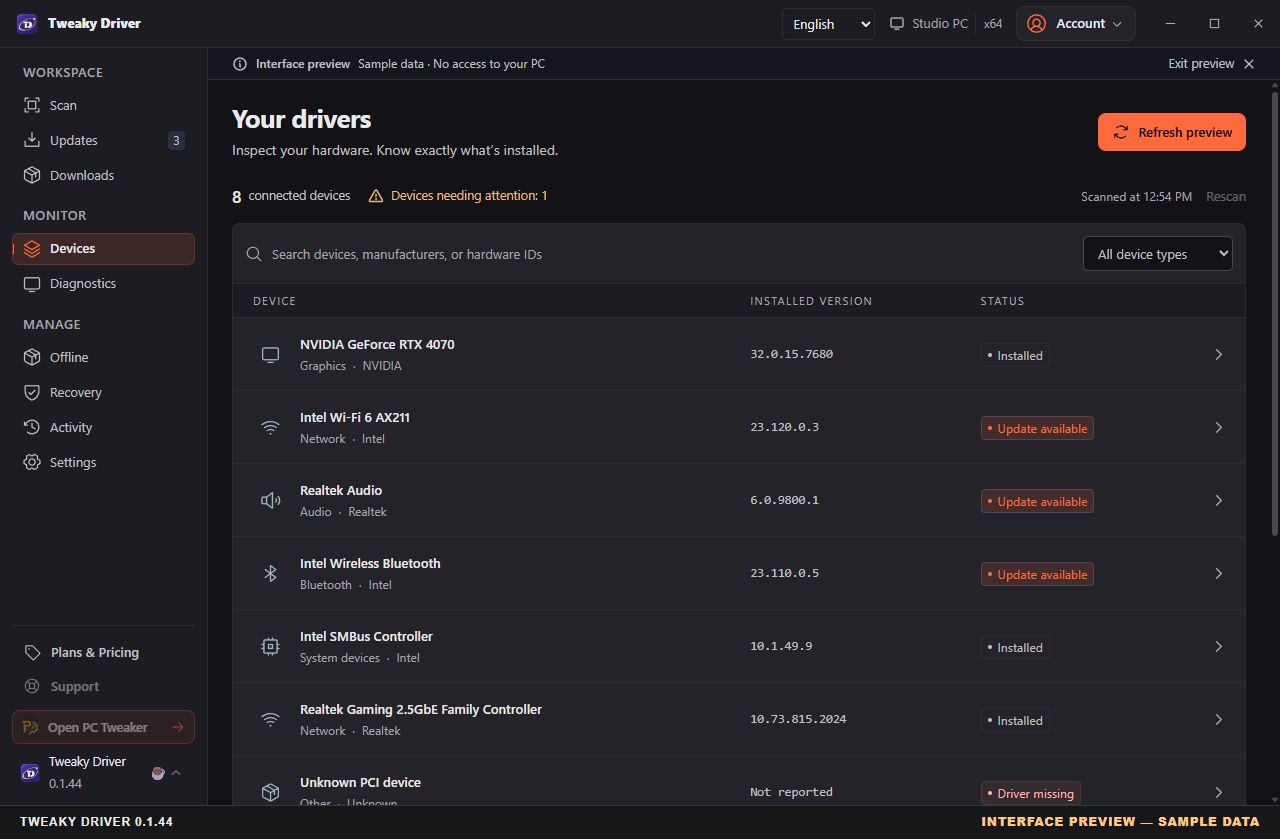
Installed versions and device status appear in the inventory. The eight devices shown are examples; detected hardware alone does not prove that an update is needed.
Open full-size preview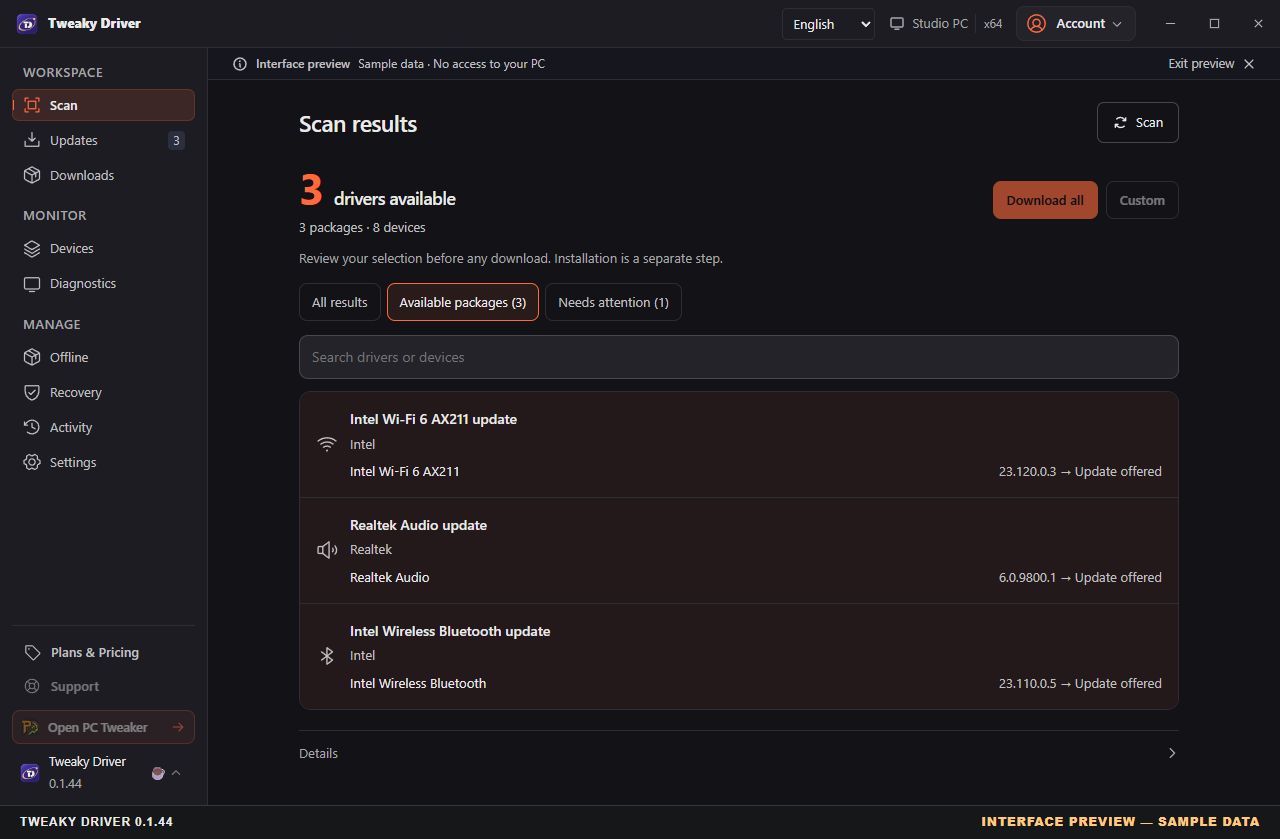
The sample scan groups three offers across eight example devices. A detected device, a download-ready offer and a catalog candidate are different states; review source and compatibility before proceeding.
Open full-size previewInspect the package source, available metadata and current selection. Downloads and installations are separate steps. The browser preview cannot change a driver on your PC.
Open full-size previewReview detected hardware and installed driver versions. An inventory is a starting point, not proof that every driver needs updating.
Download-ready offers and catalog candidates are distinct. Check versions, package sources and compatibility before proceeding.
Read the specific offer and release notes. Some packages are download-only, and discovery depends on supported sources.
Try Pro free for 3 days. Start the trial from Plans & pricing in the app: unlimited scans, downloads and installs on this PC, with a card on file. Cancel before it ends and you pay nothing; one trial per account and PC.
Free
The same full scan of supported sources as Pro, and the drivers it finds are yours to download and install until the next free scan unlocks, 10 days later. Device inventory and read-only diagnostics are always available. Needs a free account with a verified email.
€3.99 / month
or €15.99 / year Save 66%
The annual plan is €31.89 less than twelve monthly payments. Everything in Free, with unlimited scans, driver downloads and installs after you review your selection, plus saved jobs and offline kits. The first 3 days are free if you have not tried Pro yet. Activate up to two installations with either plan.
Download and start your 3-day free trial
The trial starts inside the app, on this PC, and needs a card.
Choose a plan in the app: the discount is applied at checkout. It covers only the first month or first year; renewals are at the regular price until you cancel. If you open checkout in the last 30 minutes, you still have 30 minutes to complete it at the offer price.
Prices include VAT where applicable. You choose a plan inside the app and pay through Stripe; the final amount and renewal terms are shown before you confirm.
The application targets Windows 10 and Windows 11 on x64 systems. Check the latest release notes for current requirements and known limitations.
The scan page tells you: how many devices have a driver from an official source, how many have no reliable package, how many could not be fully checked and how many are handled by Windows itself. Coverage depends on what manufacturers publish through the supported sources, so some devices may not get an official match.
Yes. From version 0.1.18, setup closes only Tweaky Driver and reopens it when the update is done; PC Tweaker, the Uninstaller and your other programs stay open. It never interrupts a driver installation in progress, and it completes an earlier update that did not finish.
From version 0.1.20, in C:\Program Files\Tweaky Driver, as Tweaky Driver.exe. Earlier versions used C:\Program Files\Driver Companion. The first update moves the app to the new folder by itself and points the Start menu entry, your desktop shortcut, a taskbar pin and scheduled scans at it. Settings, downloads and your account stay as they are. New installations offer to start the app and to create a desktop shortcut on the last setup page.
Update to version 0.1.19 or later and sign in on the Account tab with the email you used to buy. The app checks your plan when it opens, when you come back to its window and right after you sign in. If this PC is not activated yet and one of your two places is free, it activates it automatically; if both places are in use, release one in Plans & Pricing first. If the check cannot finish because you are offline or the account service cannot be reached, the app says so instead of asking you to buy again; from version 0.1.30 it keeps showing your last known plan meanwhile and tries again on its own. From version 0.1.22, a PC clock that runs ahead of the correct time (by minutes or up to a day) no longer makes the app treat a fresh Pro check as expired. Still stuck? Email tweakydriver@pctweaker.app.
Download from the official GitHub release. In Windows file properties, check that the digital signature is valid and identifies Aurelio Avila. Compare the SHA-256 with the official asset digest when available. Code signing does not guarantee that SmartScreen will never display a warning.
No. Tweaky Driver is proprietary. Its public repository contains distribution information and release notes; the application source is private. Third-party components retain their own licenses.
On the Free plan you get one complete scan every 10 days. Once it has run, you can download and install the drivers it found until the next free scan unlocks; the app shows the countdown on the scan page. The count is kept by the Tweaky Driver service for your account and this PC, so it needs a free account with a verified email; one account works in PC Tweaker, the Uninstaller and Tweaky Driver. Pro, and the 3-day free trial, scan and download without limits.
See Plans above. You subscribe from the app's plans screen, where the final amount and renewal terms are shown before you confirm. This website does not collect payments.
Use Report an issue in the application or email tweakydriver@pctweaker.app. Include your app version, Windows version and reproduction steps, but never passwords or license tokens.
PC Tweaker for inspectable Windows changes. PC Tweaker Uninstaller for reviewing software removal. Different tools, clearly explained workflows.
Also on MajorGeeks and Softpedia.